
About WhiteBox Agency
WhiteBox Agency is a browser extension for Chrome and Edge that filters sexually explicit or inappropriate content from your browsing experience. Designed for families, educators, and anyone who wants more control over what appears on screen, WhiteBox Agency empowers you to craft your own safe corner of the internet.
How WhiteBox Agency Works
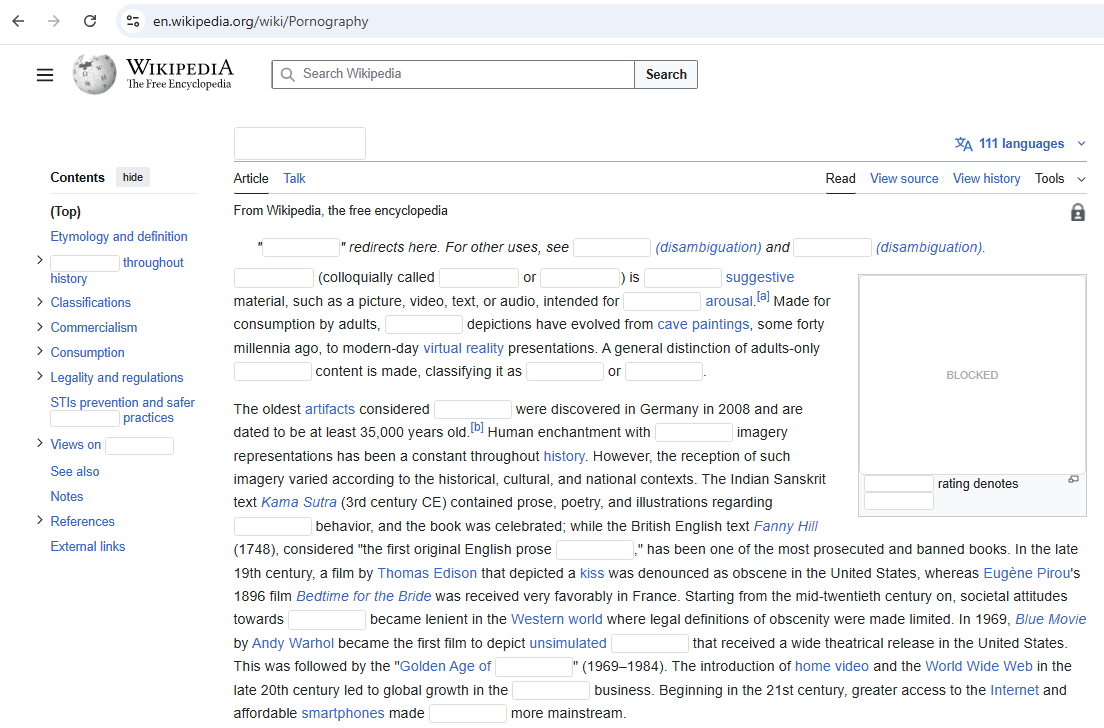
WhiteBox Agency is built for real-life browsing. Instead of blocking whole websites, it steps in as you browse and cleanly “white‑boxes” unwanted content—so the rest of the page can stay usable.
1) Detect
Scans the page as it loads and as you scroll, looking at images, text, and surrounding context.
2) Decide
Uses fast on‑device heuristics first, then AI‑assisted checks when needed—without storing your browsing history.
3) White‑Box
Replaces detected content with clean placeholders so you stay in control of what appears on your screen.
See it in action
Below are simple, cartoon-style previews of what “white‑boxing” looks like. (You can swap these for real screenshots or a short demo video any time.)
Moderate Mode

Strict Mode
Features
- Filters explicit images and text on the fly
- Customizable blocklists and allowlists
- Works offline – no external servers needed, all filtering is done locally
- Easily disable or enable with a single click
- Supports Chrome and Microsoft Edge
- Free version for basic filtering; Pro version adds advanced features and updates
What Sets WhiteBox Agency Apart
Unlike traditional filters that rely solely on predefined blocklists of domains or URLs, WhiteBox Agency actively scans the content of every page you visit and makes intelligent decisions about what you see. It uses a mix of heuristics and AI methods to detect and white‑box unwanted content—including images and text—on sites that are not blocked by normal filters. This means you’re protected even on new or obscure sites, and you stay in control of your browsing experience.
| Feature | Traditional Blocklists | WhiteBox Agency |
|---|---|---|
| Blocks whole websites | ✅ | ❌ |
| Context‑aware scanning | ❌ | ✅ |
| Works on new/unknown sites | ❌ | ✅ |
| Adjustable strictness | Limited | ✅ (None / Moderate / Strict) |
| Privacy‑first (on‑device) | Sometimes | ✅ |
| Actively adapts while you scroll | ❌ | ✅ |
Our goal is simple: keep the web usable while protecting you from what you don’t want to see.
Current Version
WhiteBox Agency is currently in an early access beta. It offers three filtering levels—None, Moderate and Strict—so you can choose how much content you want to block. Moderate mode balances protection and experience, while Strict mode aggressively filters questionable content for maximum safety. Future versions will add more customization, smarter detection and a streamlined workflow. Learn more about this release and our roadmap on the version page.
Who WhiteBox Agency Is For
WhiteBox Agency isn’t about shame or censorship—it’s about giving you practical control so you can browse with confidence.
Roadmap & Vision
The internet shouldn’t decide what appears on your screen. WhiteBox Agency exists to take an active role in protecting you—so you’re not at the mercy of whatever pops up next.
- Smarter detection: better context understanding and fewer false positives.
- Feedback loop: quick “Was this correct?” prompts to improve accuracy.
- Per‑site preferences: different rules for different sites.
- Family & device profiles: tailored protection for each person/device.
- Mobile support: long‑term goal to extend protection beyond desktop browsers.
FAQ
Does WhiteBox Agency track me?
No. WhiteBox Agency does not store browsing history. Filtering runs on your device.
Will it block entire sites?
WhiteBox Agency focuses on blocking unwanted content on a page while keeping the rest usable.
What if it misses something (or blocks too much)?
Early access means improvements are ongoing. Use the Feedback page to report misses or false positives.
Can I change strictness?
Yes—None, Moderate, and Strict are designed for different sensitivity levels.
Built for Trust
Privacy‑First
Filtering happens on your device. We don’t store browsing history.
Transparent Controls
Choose None, Moderate, or Strict—and adjust as your needs change.
Early Access, Real Feedback
We listen fast. Your feedback directly shapes improvements.
Installation & Setup
Installing on Google Chrome
1. Visit the WhiteBox Agency extension page on the
Chrome Web Store.
2. Click Add to Chrome and confirm the installation when prompted.
3. After it installs, pin the WhiteBox Agency icon from the extensions menu for quick access.
Installing on Microsoft Edge
1. Go to the Microsoft Edge Add‑ons
store and search for “WhiteBox Agency”.
2. Click Get (or Add to Edge) and approve the prompts to install.
3. Once installed, ensure WhiteBox Agency is enabled in your Edge extensions list.
Need help? Contact us at support@whitebox.com for assistance.
We Value Your Feedback
Your insights help us improve WhiteBox Agency. Whether you have suggestions, find a bug, or want to tell us how WhiteBox Agency works for you, we’d love to hear from you.